

A timed treat dispenser drops a treat at a time you set, with nobody pressing anything. A button-press dispenser does the opposite: the dog triggers it. Both get lumped together under “automatic treat dispenser”, and both are different products from the remote reward trainers and camera tossers covered in our treat dispenser hub. This guide looks only at scheduling and dog-triggered release, lists which documented models offer them, and is honest about the models that do not.
Timed vs Button-Press: Two Different Jobs
The two categories solve opposite problems. A timed or scheduled dispenser is for routine: a mid-morning snack while you are at work, a treat spaced two hours after breakfast for a dog on a calorie budget, or a predictable “something happens” moment for a dog who is home alone for long stretches. Nobody marks a behavior, so it is not a training tool, and our hub’s FAQ says the same. A button-press dispenser is enrichment and self-reward. The dog learns that pressing a pad releases a treat, which keeps a busy dog occupied and builds the kind of cause-and-effect confidence trainers use for puzzle work. It still is not a timer, and it does nothing while the dog ignores it.
Where the two overlap is the hardware underneath: a hopper, a release mechanism and a tray. The differences that matter are how the release is triggered, how far a treat travels (dropped at the base or flung across the room), and what size of treat the mechanism accepts. Those three points decide whether a listing fits your dog before any smart feature does.
How to Choose a Timed Treat Dispenser
Start with the trigger, because manufacturers describe it very differently.
- In-app schedule. You set the schedule in the maker’s app and the treat is released at that time with nobody pressing anything. Petcube documents this for Bites 2 Lite as “Auto Treats Scheduling”: you set the time, treat flinging power and serving count, and your pet gets the treat “even if” you are not there.
- Voice-assistant routine. The schedule lives in a smart speaker. Furbo’s Alexa page gives the example “tell Furbo to toss a treat every 30 minutes for 4 hours”. That needs Alexa in the home, and it runs for a set span rather than at a fixed daily time.
- Event-triggered toss. Furbo’s Alexa page says that when Furbo detects your dog being active, it sends a Dog Activity Alert and “can toss a treat to your dog automatically”. It is automatic, but it is not a timer.
- No scheduling. eufy’s support page states that the Pet Camera D605 “cannot automatically dispense dog treats at random” and is “unable to dispense dog treats based on a preset schedule”. That rules out a camera tosser this site already covers, even though it is a good fit on our pet cameras with treat dispensers page.
Then check the mechanics:
- Treat size and shape. Petcube says Bites 2 Lite takes “crunchy treats with dimensions of 1 inch or less”. Instachew lists the Purechew Snack for hard or freeze-dried treats up to 15 mm. Soft or crumbly treats are not documented for either.
- Drop or fling. A tossing camera throws treats; Petcube says you can “control the amount and distance”. Other dispensers release the treat at the unit. Flinging is fun for a confident dog and startling for a nervous one.
- Capacity in treats, not cups. Petcube lists 1.5 lb of treats; Furbo lists about 100 treats; Instachew lists 1 L. None is a meal’s worth of food, and that is by design.
- Power and connectivity. Petcube lists 2.4 GHz WiFi for Bites 2 Lite, which matters if your router hides that band; the Furbo pages we checked do not state a band. Instachew lists the Snack as cable power only. The TRIXIE game runs on batteries or the included USB-C cable with a USB mains plug that TRIXIE sells separately.
- Subscription dependence. Petcube describes Petcube Care as “an optional subscription service”, and treat scheduling is set in the camera’s app settings. Furbo lists video history and its AI-powered features “via subscription” (Furbo Nanny).
Timed and App-Scheduled Models
These are the models whose maker pages document a schedule or an automatic trigger. Specifications below restate the manufacturer pages cited in the product notes; nothing here comes from hands-on testing.

Petcube Bites 2 Lite
Best for: A scheduled treat routine from the app, with remote flinging and video when you want it.
- Auto Treats Scheduling in the Petcube app: set the time, flinging power and serving count
- treat container holds up to 1.5 lb; crunchy treats 1 inch or smaller; control the amount and distance of each toss
- 1080p, 160° wide-angle lens, night vision; 2.4 GHz WiFi; Petcube Care subscription is optional

Furbo 360° Dog Camera — core-features package
Best for: Households that already use Alexa and want repeated tosses on a voice-set schedule.
- 1080p rotating 360° view, 4x digital zoom; treat tossing with about 100-treat capacity
- scheduling runs through Alexa (“tell Furbo to toss a treat every 30 minutes for 4 hours”), not a standalone in-app timer
- can toss a treat automatically when it detects your dog being active (Dog Activity Alert)

Instachew Purechew Snack
Best for: App-scheduled treat times with a camera, for hard or freeze-dried treats up to 15 mm.
- schedule treat times in the app or use the instant feed option; single treat dispensing
- 1 L capacity; hard or freeze-dried treats up to 15 mm; cable power only
- 3 MP (2304 × 1296) camera with night vision and motion alerts; cloud storage compatible
Button-Press and Owner-Pressed Models
“Button-press” means two things in listings. The dog-pressed version is a game: a separate release button the dog presses to make a dispenser release treats. The owner-pressed version is a remote reward trainer, which belongs to active training and is covered on the hub. One documented model of each is below so the difference is clear in one place.

TRIXIE Memory Trainer 3.0
Best for: A dog-triggered button game: the dog presses the button, the dispenser releases the treat.
- separate release button the dog presses; range up to 40 m from the dispenser
- rotating reservoir with an adjustable opening to regulate how fast treats fall
- 3 AAA plus 4 C batteries (not included) or the included 1.5 m USB-C cable with a USB mains plug sold separately
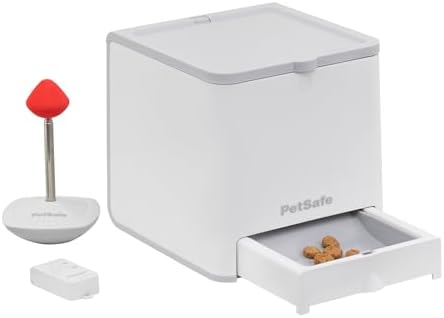
PetSafe Teach & Treat Remote Reward Trainer
Best for: Owner-pressed drops during live training; a handheld button rather than a timer.
- 3-cup treat or kibble capacity
- handheld remote with a listed 90 ft range
- two treat-dispensing discs included
TRIXIE’s page says the Memory Trainer 3.0 button works up to 40 m from the dispenser, so the two parts can sit in different rooms once the dog understands the game, and the reservoir opening is adjustable to slow the flow. TRIXIE calls it a “challenging game for pros” and suggests starting with the button attached to the dispenser, then increasing the distance once the dog understands the game, so expect to build it up over several sessions rather than switch it on and walk away. An earlier 2.0 version also exists, so check that the listing names version 3.0.
Scheduling Without a Dedicated Device
If your dog already eats from an app-controlled feeder, check whether its app can add a small extra “snack” meal of kibble at a set time. PETLIBRO’s Granary WiFi page describes “meals or snacks” up to 10 times a day, and PetSafe’s Smart Feed schedules “up to 12 meals daily in sizes from 1/8 cup”, and its “Feed Now” feature “lets you instantly feed your pet an extra meal or snack”. That is kibble rather than a treat, and it comes out of the meal hopper, so it is portion-controlled by default. For dogs on a strict diet it is often the better version of a scheduled treat. Our smart dog feeder guide and timed dog feeder guide cover those feeders in full.
| Model | Trigger | Delivery | Documented treat limit | Needs |
|---|---|---|---|---|
| Petcube Bites 2 Lite | In-app Auto Treats Scheduling, plus manual | Flings; amount and distance adjustable | Crunchy treats 1 in or less; 1.5 lb container | 2.4 GHz WiFi; Petcube Care optional |
| Furbo 360° Dog Camera | Alexa voice routine; automatic toss on Dog Activity Alert | Tosses | About 100 treats | Alexa for schedules |
| Instachew Purechew Snack | In-app scheduling, plus instant feed | Not stated | Hard or freeze-dried up to 15 mm; 1 L | App; cable power |
| TRIXIE Memory Trainer 3.0 | Dog presses a remote button | Treats fall out of the dispenser | Adjustable reservoir opening; no size stated | 3 AAA + 4 C batteries, or USB-C with a separately sold USB mains plug |
| PetSafe Teach & Treat | Owner presses handheld remote (90 ft) | Drops | Two dispensing discs; 3 cups | 4 D batteries |
| eufy Pet Camera D605 | Manual only; eufy says no schedule or random mode | Tosses (manual, from the eufy Pet app) | Not stated for scheduling | Listed for comparison; not a timed model |
Treats Still Count as Calories
A dispenser that fires three or four times a day can add a meaningful share of a small dog’s intake without anyone noticing, because nobody hands the treat over; our small-dog feeder guide shows how small those daily totals can be. Before setting a schedule, weigh one day’s worth of treats and compare it with the daily total from our food calculator. If the number is high, reduce the serving count, switch the schedule to kibble from a meal feeder as described above, or pick a lower-calorie treat that still fits the maker’s size limit. Water matters too: a dog snacking on dry treats through the day should have a full bowl, and our dog water dispenser guide covers fountains and gravity options.
Quick Checklist Before You Buy
- Decide whether you want a schedule (no dog input), a dog-pressed button (no schedule) or a remote you press yourself
- Confirm the schedule lives in the device or app, not only in a smart speaker, if you do not run Alexa
- Measure your treats against the maker’s stated limit (1 inch for Petcube; up to 15 mm for Instachew)
- Check the WiFi band: Petcube lists 2.4 GHz WiFi; confirm Furbo’s requirement on its listing
- Read what sits behind a subscription before relying on it (Furbo lists video history and AI-powered features via its Furbo Nanny subscription)
- Count the scheduled treats against the day’s calories, especially for dogs under 20 lb
Want video and remote tossing first, schedule second? Start with our pet cameras with treat dispensers comparison, then come back here for the scheduling details. For full meals on a timer, see timed dog feeders.
Frequently Asked Questions
Can a timed treat dispenser replace a meal feeder?
No. The documented capacities are 1 L, 1.5 lb of treats or about 100 pieces, and the mechanisms are built for treat-sized pieces. For scheduled meals use an automatic feeder; our dog feeder hub compares them.
Does the Furbo 360° Dog Camera have a built-in treat timer?
Furbo documents scheduled tossing through Alexa voice commands, such as a treat every 30 minutes for 4 hours, and its Alexa page also describes an automatic toss when Furbo detects your dog being active. We found no standalone in-app daily timer on Furbo’s pages.
Which treat dispensers let the dog press a button?
TRIXIE Memory Trainer 3.0 is the manufacturer-documented example: a separate release button the dog presses, with a range of up to 40 m from the dispenser. A remote reward trainer such as PetSafe Teach and Treat is pressed by the owner, not the dog.
Will a scheduled treat dispenser work for a cat?
Mechanically yes, as long as the treat fits the stated size range. Petcube lists Bites 2 Lite for pets generally, and our treat dispenser hub notes that scheduled dispensers are not dog-specific. Check the treat size and the fling distance for a smaller animal.