

How These Cameras Throw Treats
The feature that defines this category — a dog camera that throws treats, sometimes described as a treat tossing dog camera or a dog treat launcher with camera — uses a small motorized launcher inside the unit to shoot a treat out with real force, not just drop it at the base. It’s a genuinely different mechanism from a simple gravity treat dispenser: the launch has some distance and a bit of randomness to where it lands, which is part of the appeal (and part of why placement height matters — too low, and treats end up sliding under furniture). Two honest things worth knowing before buying: portion consistency isn’t perfect — some models will fire two or three treats at once rather than exactly one, especially with smaller treats — and hopper openings are usually sized for a specific treat shape, typically small, crunchy, and uniform (commonly around an inch or less), so soft or irregular treats may jam.
Two-Way Video and Audio
Beyond the treat toss, a two way pet camera with treats adds live video streaming and a microphone/speaker pair so you can see and talk to your pet remotely — sometimes described as a dog facetime treat dispenser or an interactive dog camera with treat dispenser. Most models let you record a short custom sound or phrase (often limited to just a few seconds) that plays before or during a treat toss, which matters more than it sounds — pets learn to associate that specific sound with a treat coming, and a custom recording tends to work better than the device’s default chirp or beep, especially for a nervous pet.
For Cats: Does the Treat-Tossing Feature Actually Work?
This is the real question if you’re buying a cat treat dispenser with camera rather than a dog one, and the honest answer is: it depends on the cat, and it usually takes more setup than it does for a dog. Dogs tend to catch on to “sound means treat is coming” quickly and get visibly excited by the toss itself. Cats are more variable — some are sensitive to the device’s default sounds and respond with a startle or a retreat rather than curiosity, and manufacturer guidance for cat owners commonly recommends recording a custom sound and expecting a real adjustment period (sometimes described in terms of weeks, not days) before a cat associates the device positively rather than avoiding it. Some cats will also only approach and eat a tossed treat while their owner is home, treating it more cautiously than a dog would — which somewhat undercuts the “reward your cat while you’re away” pitch unless you build up to it gradually.
Because of this gap, at least one major brand now makes a cat-specific version of its camera rather than just marketing the dog model at cat owners — notably including a detachable feather toy attachment as an added engagement option for cats who aren’t strongly food-motivated by a flying treat. If you’re shopping specifically for a cat treat feeder with camera, checking whether a brand offers a cat-specific model (versus just the dog version relabeled) is worth doing before you buy. The video monitoring and two-way audio side of a wifi cat treat dispenser works exactly the same regardless of species — it’s specifically the toss-and-catch spectacle that needs realistic expectations for a cat, and even a remote cat treat dispenser used purely for scheduled treats without much fanfare is a reasonable way to sidestep the issue entirely.
Connectivity: WiFi, App, and Voice Control
Every model in this category connects over WiFi rather than Bluetooth, since remote video and treat tossing both require an internet connection, not just short-range pairing — but many current models specifically require a 2.4GHz network rather than supporting 5GHz, which is worth checking against your router before buying an app controlled dog treat dispenser. Voice assistant support is inconsistent across brands: some models offer alexa dog treat dispenser or google home dog treat dispenser compatibility, usually through a basic skill rather than deep integration, so verify support for the specific model rather than assuming it from “smart” branding alone.
Best Pet Camera Treat Dispensers

Furbo 360° Dog Camera — core-features package
Best for: Treat tossing with basic use without an ongoing plan.
- 1080p rotating view
- two-way audio
- treat tossing; Furbo Nanny is optional for extra history and alerts
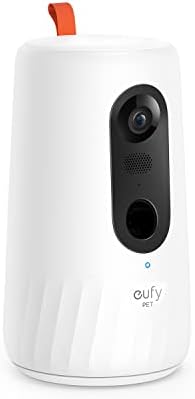
eufy Pet Camera D605
Best for: Treat tossing with built-in local storage.
- three treat-toss distance settings
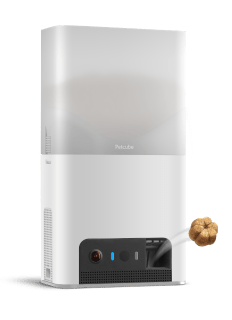
Petcube Bites 2 Lite
1080p HD pet camera with a 160° wide-angle view, two-way audio, night vision, and a built-in treat dispenser.
- Furbo — the best-known name in the category, with a dedicated dog camera and a separate Furbo 360° Cat Camera built specifically for cats, including a detachable feather toy attachment the dog version doesn’t have. Real specs on the cat model: 1080p resolution, 132° wide-angle lens, full 360° rotation, 4x digital zoom, and a roughly 100-treat hopper.
✓ Pros
- Best-known, most polished brand in the category — dedicated dog camera plus a separate cat-specific version with a feather toy attachment
- 1080p, 132° wide-angle lens, full 360° rotation, 4x digital zoom
- ~100-treat hopper
✕ Cons
- Standalone Furbo includes live view, two-way talk, treat tossing and basic barking/meowing alerts without Furbo Nanny; subscription-required packages need an active plan, and premium history/alerts differ
- Premium pricing vs. competitors
Price: Check current price — Furbo pricing and subscription bundles change frequently
- Petcube Bites 2 Lite — 1080p with a 160° wide-angle view and 8x digital zoom, a treat launcher where the app lets you adjust both amount and distance, and a 1.5 lb hopper that takes uniform crunchy treats around an inch or under. Live streaming and 30-second clips are included free; extended video history requires an optional monthly subscription.
✓ Pros
- Adjustable treat-toss distance, not just on/off — a real precision advantage
- 160° wide-angle view with 8x digital zoom
- 1.5 lb hopper holds more than Furbo’s ~100-treat capacity
✕ Cons
- Extended video history sits behind an optional monthly subscription
- Some integrations and app features can change over time — check Petcube’s current feature list before buying
Price: Check current price at Petcube
- Skymee Owl Robot — a genuine outlier in the category: instead of sitting in one spot, it’s mobile and can roam through the house via app control, on top of the usual camera, two-way talk, and treat dispensing. 1080p, 2.4GHz WiFi only, no monthly subscription required.
✓ Pros
- Genuine outlier — mobile, roams the house via app control rather than sitting fixed in one spot
- No monthly subscription required
- Camera, two-way talk, and treat dispensing combined
✕ Cons
- 1080p only, no 2K option
- 2.4GHz WiFi only — no 5GHz support
- Mobility is a novelty that adds mechanical complexity vs. a fixed unit
Price: Check current price
- Smaller or budget options worth knowing about: Dogness, WOpet, Pawbo, Petzi, and Iseebiz all make budget-to-midrange versions of the same camera-plus-launcher concept, along with newer entrants like View Cube and PetChatz — feature sets vary more than the big three above, so check specs like treat size compatibility and WiFi band directly rather than assuming parity.
As with any best dog camera treat dispenser or best dog treat dispenser with camera list, treat this as a starting point — pricing, subscription terms, and specific features shift often enough to be worth checking current listings before buying.
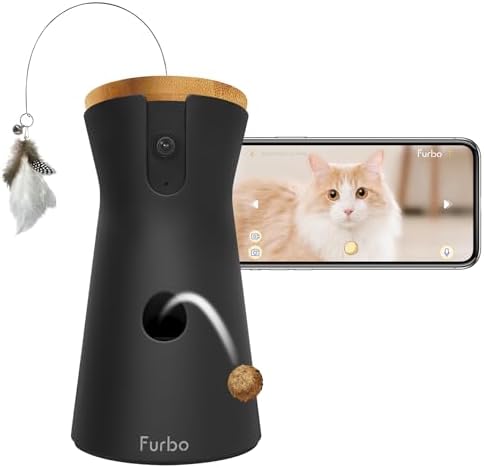
Furbo 360° Cat Camera — core-features package
Best for: Cat homes that want treat tossing plus a play accessory.
- 1080p rotating 360° view, 4x digital zoom
- treat tossing; about 100-treat capacity
- Feather Wand Toy included
Quick Checklist Before You Buy
- If buying for a cat, look for a cat-specific model or plan for a real adjustment period, not instant engagement
- Check treat size and shape compatibility against what your pet already eats
- Confirm 2.4GHz WiFi support matches your home network
- Understand what’s free (live view, short clips) versus what needs a subscription (extended video history)
- Don’t expect perfectly consistent single-treat dispensing — budget for some variance
Need measured meals rather than tossed rewards? Compare dedicated cat feeders with cameras or dog feeders with cameras; those products prioritize scheduled food portions instead of treat-based interaction.
Frequently Asked Questions
Will my cat actually react to the treat-tossing feature?
Some cats do, especially with a custom recorded sound and a gradual introduction period; others stay indifferent or even avoid the device at first. Video monitoring and two-way audio work the same either way — it’s specifically the toss-and-catch engagement that’s less reliable with cats than with dogs.
Do I need to pay a subscription to use one of these?
It depends on the exact model and package. Standalone Furbo retains live view, talk, treat tossing and basic barking/meowing alerts without Furbo Nanny. Subscription-required Furbo packages require an active plan. Recording/history and advanced alerts vary; check the package terms before buying. Furbo explains standalone basic features and subscription-required packages.