

Do pet cameras require a subscription?
Some standard cameras provide live viewing without a paid plan; others reserve history or smart features for a subscription. Certain hardware offers also require a subscription to activate or meet a minimum commitment. The useful question is not just “Is this brand subscription-free?” It is “Will this exact camera and purchase package do my required job without an ongoing plan?”
This guide uses manufacturer documentation, not hands-on testing. We recommend candidates by documented workflows. A free live stream, local memory-card recording and automatic cloud history are three different things.
Pick your no-fee requirement first
| Required job | What to verify | What not to assume |
|---|---|---|
| Occasional live check-in | App live access without a paid plan | That missed activity was saved |
| Review activity locally | Compatible card, recording settings and playback workflow | That the card is included or provides cloud backup |
| Automatic cloud clips | Plan requirements, retention and renewal | That free viewing includes automatic history |
| Treat interaction | Exact package allows basic treat functions | That a discounted bundle works like a standard device |
If reviewing last night’s activity is essential, eliminate cameras that only establish free live viewing. If checking the room at lunchtime is enough, local storage may be optional. Define that difference before comparing models.
Local-recording candidates

TP-Link Tapo C220
Best for: Local recording without a required cloud plan.
- 2K indoor pan-and-tilt video
- microSD support up to 512 GB; card sold separately

Wyze Cam Pan v3
Best for: A second memory-card pan-and-tilt path.
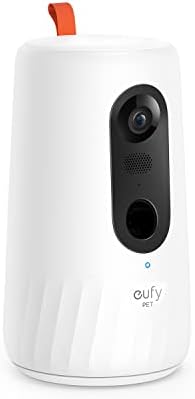
eufy Pet Camera D605
Best for: Treat tossing with built-in local storage.
- three treat-toss distance settings
Tapo C220 — a documented memory-card path
The US specifications list 2K QHD video, two-way audio and local microSD storage up to 512 GB. The card is purchased separately; Tapo Care is a paid cloud option. This is a candidate when local recordings matter and you do not need treats.
Wyze Cam Pan v3 — keep the version explicit
The Pan v3 product page lists 1080p, pan/tilt, two-way audio and microSD support. Assess the local-storage workflow separately from paid cloud and browser features. This recommendation concerns Pan v3, not Pan v4 or another Wyze model.
Check Pan v3 specifications and local storage. Check current Web View restrictions separately.
A card records on the device; it is not automatically an off-site copy. Check the chosen recording schedule, whether older footage overwrites, and how playback is accessed. Test the actual workflow before expecting a saved record while away. Capacity alone does not establish a fixed number of days.
Pet-focused candidates for free basic viewing
Petcube Cam 360 — no treats required
The standard camera’s FAQ describes no default monthly fee, with Care as an optional cloud plan. It suits a rotating live-view use case; do not treat optional Care as proof that automatic cloud history is free.
Furbo 360 cameras — only the correct purchase package
Furbo distinguishes Standalone basic functions from Subscribe & Save subscription-required models. Verify that distinction on the selected offer before treating a Furbo camera as a no-subscription option.
PETLIBRO Scout — live use and cloud use are separate
PETLIBRO’s Video Cloud AI FAQ describes free live streaming without a subscription but no video storage or behavior alerts on that path. Scout uses cloud storage rather than a memory card, so it does not fit a local-recording requirement.
Read the Video Cloud AI free-versus-paid FAQ.
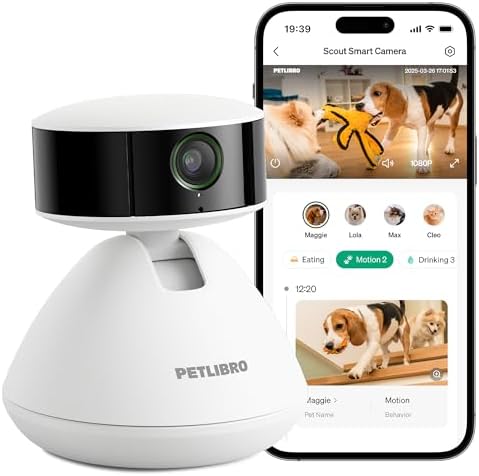
PETLIBRO Scout PLPC001
White standalone pet camera, selected with a 7-day AI trial. Free live viewing and paid cloud features are separate; it has no microSD recording. Recognition can be less reliable for similar-looking pets. A trial is not a permanent free subscription.
Bundles can change the answer
Do not infer required-package terms from a standard camera description. Petcube Care Bundle describes at least 12 months of subscription renewal. Furbo’s US terms describe required subscription offers with an activation and minimum-commitment arrangement. Read the exact offer you intend to purchase.
Write down the hardware charge, minimum subscription commitment, renewal period and usable functions after cancellation. A lower upfront camera price can represent a different purchase arrangement rather than better value for a no-fee household. We do not quote a fixed first-year price without that package information.
Which option should you choose?
- Need local recorded history: begin with the documented Tapo C220 or Wyze Pan v3 memory-card path; verify card and playback details.
- Need a rotating pet-focused live view: compare a standard Petcube Cam 360.
- Need treats and no ongoing plan: check Furbo’s Standalone arrangement carefully and compare standard Petcube device functions; avoid required bundles.
- Want behavior recaps or automatic cloud history: re-evaluate whether a paid feature meets a real need rather than assuming it is free.
This is not a ranking of image quality or reliability. App access, power and a working network still matter without a subscription. See our treat-camera guide if dispensing rewards is the main buying task.
Questions to resolve before checkout
Does no subscription mean no account? No. These app-controlled workflows can still require a manufacturer account. Check the setup documentation.
Will cancellation delete or retain old clips? Check the selected provider’s current plan and export rules; do not assume live-view access preserves cloud history.
Can I use a camera instead of arranging care while traveling? Observation and care are different jobs. Combine any camera with a real backup plan and the vacation feeding checklist.
Return to the Pet Cameras hub for the overall buying framework.
For the package differences behind the brand names, see Furbo vs Petcube. Review account access, storage and privacy settings before leaving a camera connected. The same plan question comes up with trackers; see GPS collars with a subscription vs without.